Home > Quoting > Getting Started > Set Up > Set Up Processes
Set Up Processes
Processes are labor related tasks or steps carried out to make Products – examples of Processes are cut, assemble, etc.
To set up Processes in Empower Quoting, from the main menu, go to Set Up > Process.
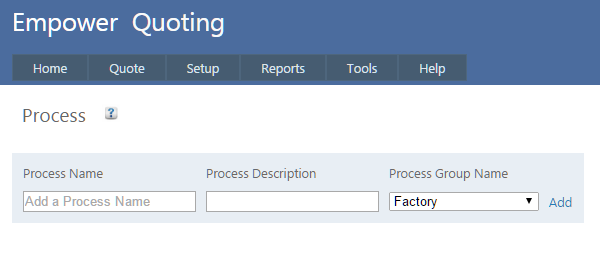
As an example, under Process Name, type in Make Legs and under Process Group Name select Factory and then click Add.
In the next line, type in Make Top and Factory and in the next line Make Seat and Factory and then Assembly and Factory.
If you make a mistake, either click on Edit to edit your work or click on Delete and delete that process.
Your page should look like
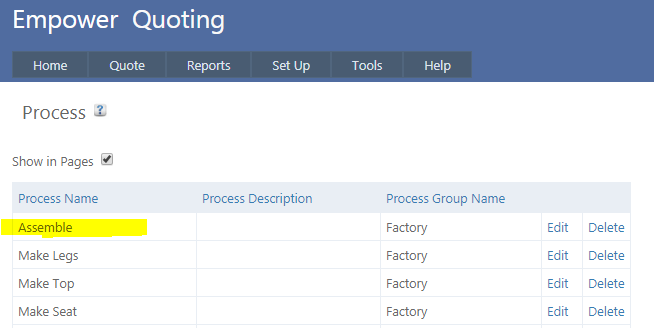
The default sort on this page is to display Processes in the order that they have been entered into Empower - note for example that Assemble is at the top of the list.
To change the order simply drag and drop the appropriate Processes around - e.g. you may wish to display Assemble after the Make Seat Process as highlighted below.
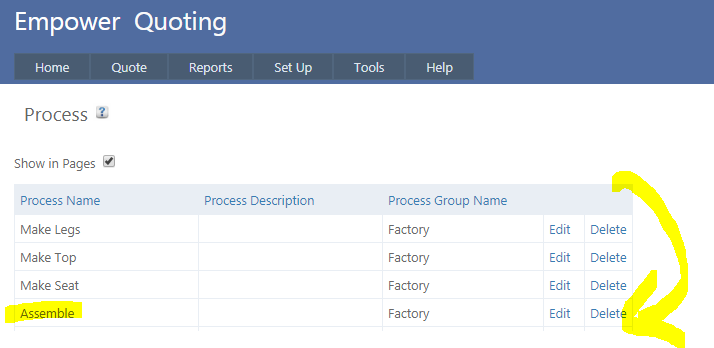
If you find you cannot drag and drop the Processes around try refreshing the page in your browser before doing the drag and drop.
When choosing Processes decide on the steps that you wish to break your Products down into to track the associated times.
These need to be practical sized Processes. We suggest you approach your Processes in two stages
- Stage One - when you start to use Empower Quoting - have fewer Processes which might involve grouping a number of Tasks together
- Stage Two - when you are three months or so down the track in using Empower Quoting you may wish to get more detail by splitting your Processes into more detail.
Fewer Processes allows for simplicity – i.e. fewer issues and problems understanding and learning Empower Quoting.
Empower recommends that the
- Number of Processes should initially be (on average) between two and five per Product
- Expected time to complete each Process be between 15 minutes and twenty four hours. If Processes take less than 15 minutes you may be getting too detailed.
Once you have set up your Processes you can start to Setup Products.
See also
|