Home > Factory Productivity and Scheduling > Advanced Topics > Health And Safety Issues > Setting Up Health And Safety Issues
Setting Up Health And Safety Issues
To set up Health and Safety Issues,
1. Enable Health And Safety Issues. To do this, from the Main Management Menu, select Tools > Settings. Select the General tab on the left side and click on Advanced Settings - see below.
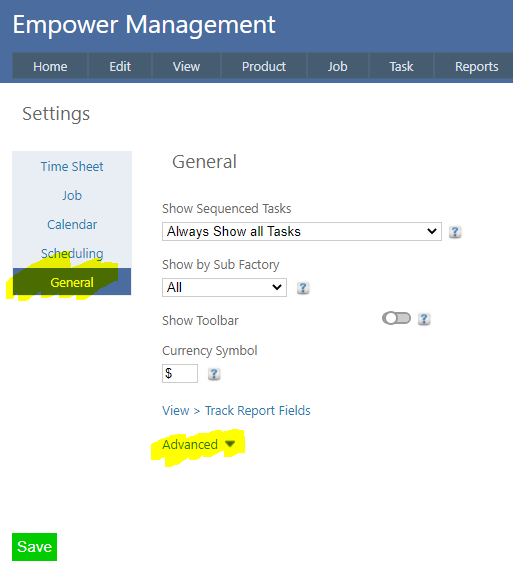
2. After clicking Advanced you should see
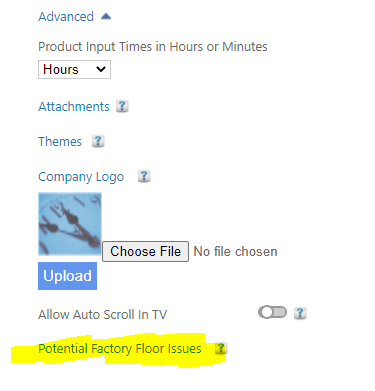
3. Now click on Potential Factory Floor Issues.
Ensure that Enable Health and Safety Issues is switched on (see highlighted below) and click on the Save button.
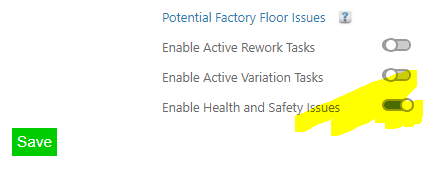
Switching this on displays
4. Now set up Health And Safety Issues. These are the issues that Factory Employees will be able to select from a drop down list.
To do this, from the Main Management Menu select Set Up > Advanced Set Up > Health and Safety Issues.
You should see a page similar to
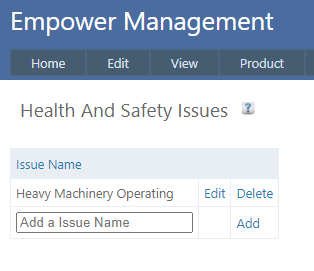
Add as many Health and Safety Issues as you wish.
See also
|