Home > Factory Productivity and Scheduling > Advanced Topics > Advanced Task Topics > Highlight Over Budget Tasks
Highlight Over Budget Tasks
In a number of pages its possible to have Task Budgets highlighted in bold and red when they are over Budget.
As an example the following is an example from the Job > View > View Job page.
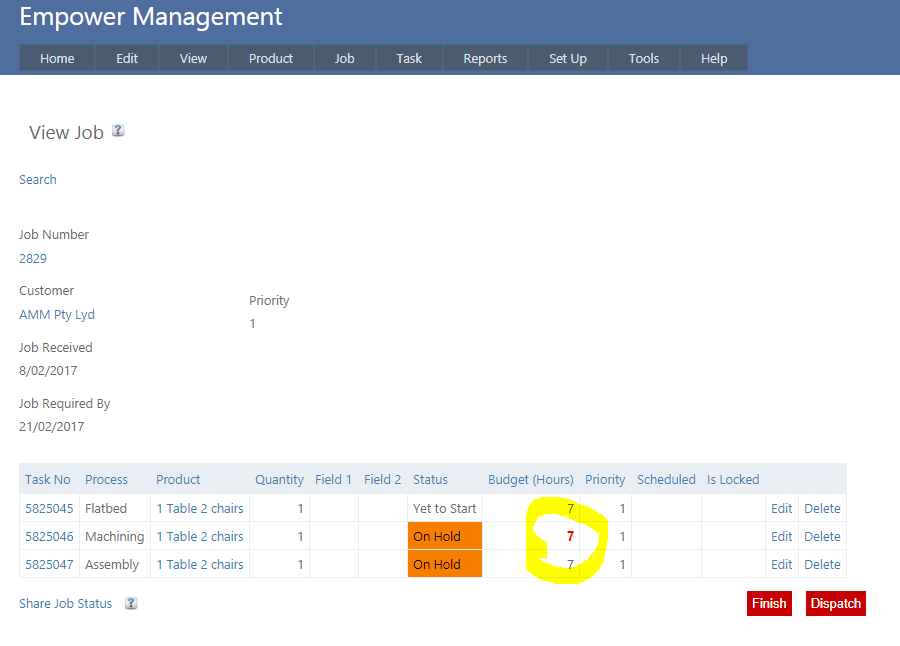
The second Task in this Job has the Budget Hours highlighted in bold and red (circled above).
This means that the more than 7 hours has been spent on this Task.
To set this up, from the Main Management Menu, select Tools > Settings and then the Job tab (see highlighted below).
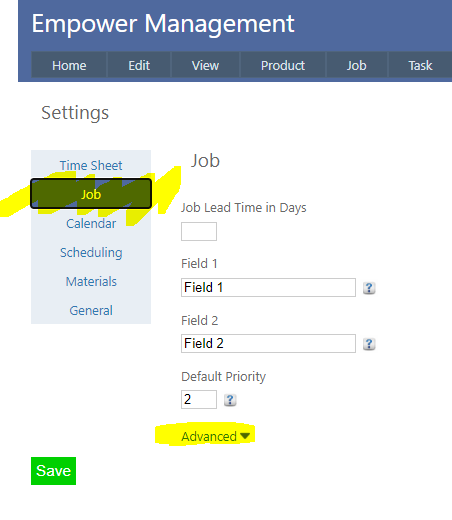
Clicking on the Advanced button (highlighted above) displays a number of additional advanced settings.
Ensure that Highight Over Budget Tasks is set to On (as displayed below)

Note that only an Administrator can alter this setting.
See also
|